iOS design history: the iPhone interface from 2007 to iOS 27
Every major change to the iPhone interface, from slide to unlock in 2007 to iOS 27's Liquid Glass slider: what changed, why, and what it still decides.

On this page
Apple has rebuilt the look of the iPhone three times. Skeuomorphism ran from the first iPhone in 2007 to iOS 6 in 2012. Flat, layered design ran from iOS 7 in 2013 to iOS 18 in 2024. Liquid Glass arrived with iOS 26 in 2025, and iOS 27 softened it a year later with a slider that runs from ultraclear to fully tinted.
Each reset followed new hardware or a new design lead: the first iPhone, Jony Ive's takeover of interface design in 2012, and Vision Pro, whose visionOS inspired Liquid Glass. The two most recent resets both overshot, and Apple corrected each within months. The interaction model moved even more often: multitouch in 2007, the App Store in 2008, gestures instead of the Home button in 2017, the Dynamic Island in 2022 and Siri AI at the top of the screen in 2026.
Appetite UI is a Figma UI kit for iOS and Android apps, built like a design system. I design it, so this history is written for people who draw iPhone screens for a living: every era ends with what it still changes in the components you use. Dates, numbers and quotes were checked on October 29, 2026, against Apple's press releases and the publications that reported them, listed under Sources.
What were the big shifts in iPhone UI design?
Twenty major releases in nineteen years fall into three visual eras and five turning points in how the phone is used. The timeline below shows them on one axis with the hardware and the people in charge; the table lists every release and the one change that defined it.
| Version | Released | Shipped with | The change that defined it |
|---|---|---|---|
| iPhone OS 1 | June 29, 2007 | iPhone | Multitouch, slide to unlock, pinch to zoom, inertial and rubber band scrolling |
| iPhone OS 2 | July 11, 2008 | iPhone 3G | The App Store and native third-party apps |
| iPhone OS 3 | June 17, 2009 | iPhone 3GS | Copy and paste, Spotlight, VoiceOver |
| iOS 4 | June 21, 2010 | iPhone 4 | Multitasking, folders, wallpapers, Retina at 2x |
| iOS 5 | October 12, 2011 | iPhone 4S | Notification Center, iMessage, Siri |
| iOS 6 | September 19, 2012 | iPhone 5 | Apple Maps, the 4-inch screen, peak skeuomorphism |
| iOS 7 | September 18, 2013 | iPhone 5s, 5c | Flat redesign: translucency, layers, thin type, Control Center |
| iOS 8 | September 17, 2014 | iPhone 6, 6 Plus | Bigger screens, extensions, widgets in Today view, adaptive layout |
| iOS 9 | September 16, 2015 | iPhone 6s | San Francisco as the system font, 3D Touch |
| iOS 10 | September 13, 2016 | iPhone 7 | New Lock Screen and notifications, slide to unlock retired |
| iOS 11 | September 19, 2017 | iPhone 8, iPhone X | Large titles, Home button replaced by gestures on iPhone X, safe areas |
| iOS 12 | September 17, 2018 | iPhone XS, XR | Screen Time, grouped notifications |
| iOS 13 | September 19, 2019 | iPhone 11 | Dark Mode, SF Symbols, card sheets |
| iOS 14 | September 16, 2020 | iPhone 12 | Home Screen widgets, App Library, compact calls |
| iOS 15 | September 20, 2021 | iPhone 13 | Focus, the Safari tab bar reversal |
| iOS 16 | September 12, 2022 | iPhone 14, 14 Pro | Custom Lock Screen, Dynamic Island on 14 Pro, Live Activities in 16.1 |
| iOS 17 | September 18, 2023 | iPhone 15, 15 Pro | StandBy, Contact Posters, interactive widgets, Action button on 15 Pro |
| iOS 18 | September 16, 2024 | iPhone 16 | Free icon placement, dark and tinted icons, Camera Control |
| iOS 26 | September 15, 2025 | iPhone 17, iPhone Air | Liquid Glass and year-based version numbers |
| iOS 27 | September 14, 2026 | iPhone 18 Pro, iPhone Duo | Liquid Glass slider, sharper icons, Siri AI |
Release dates for iOS 4 to iOS 18 follow Wikipedia's iOS version history; every other date links to Apple's own announcement in the section that covers it.
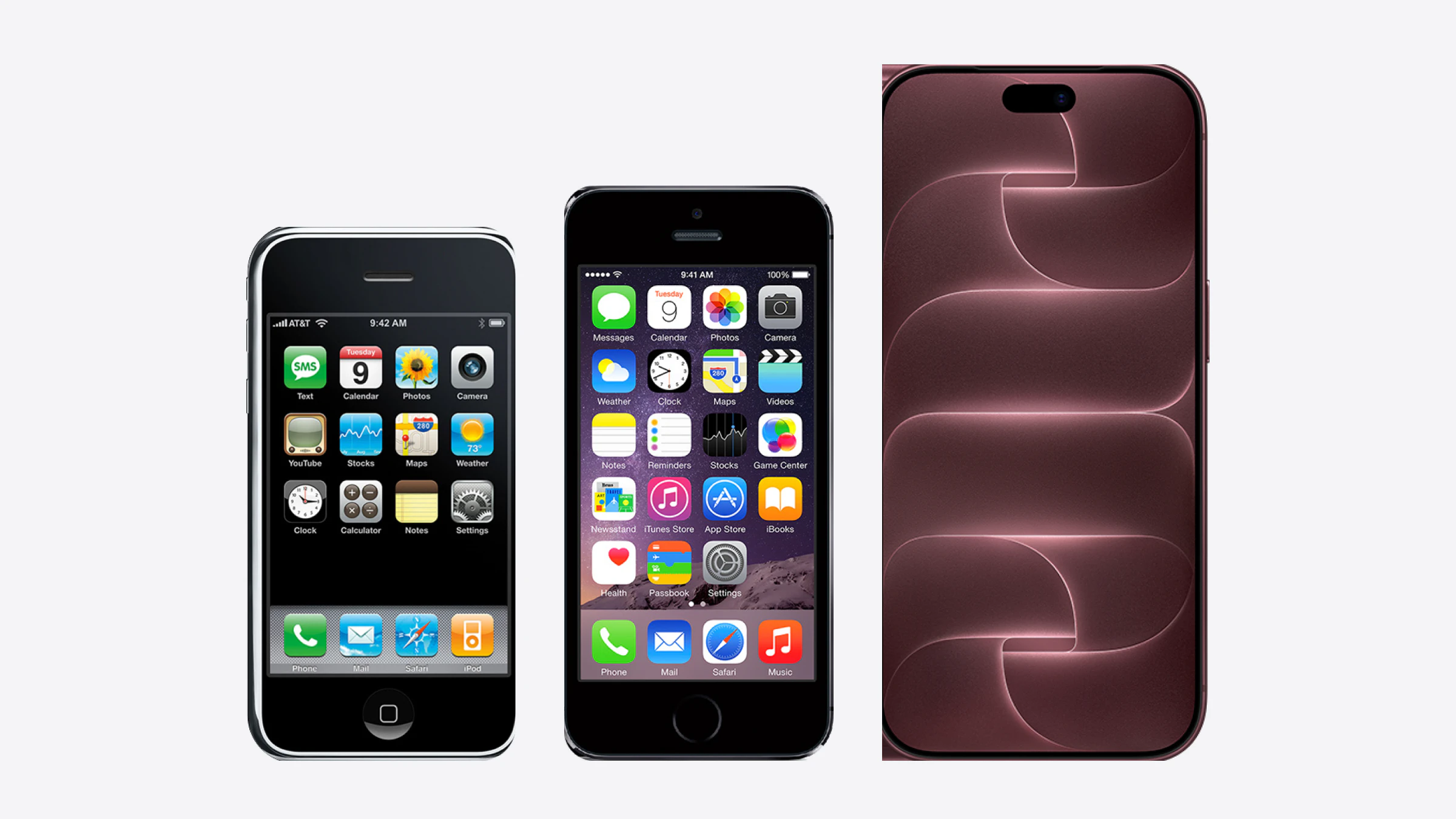
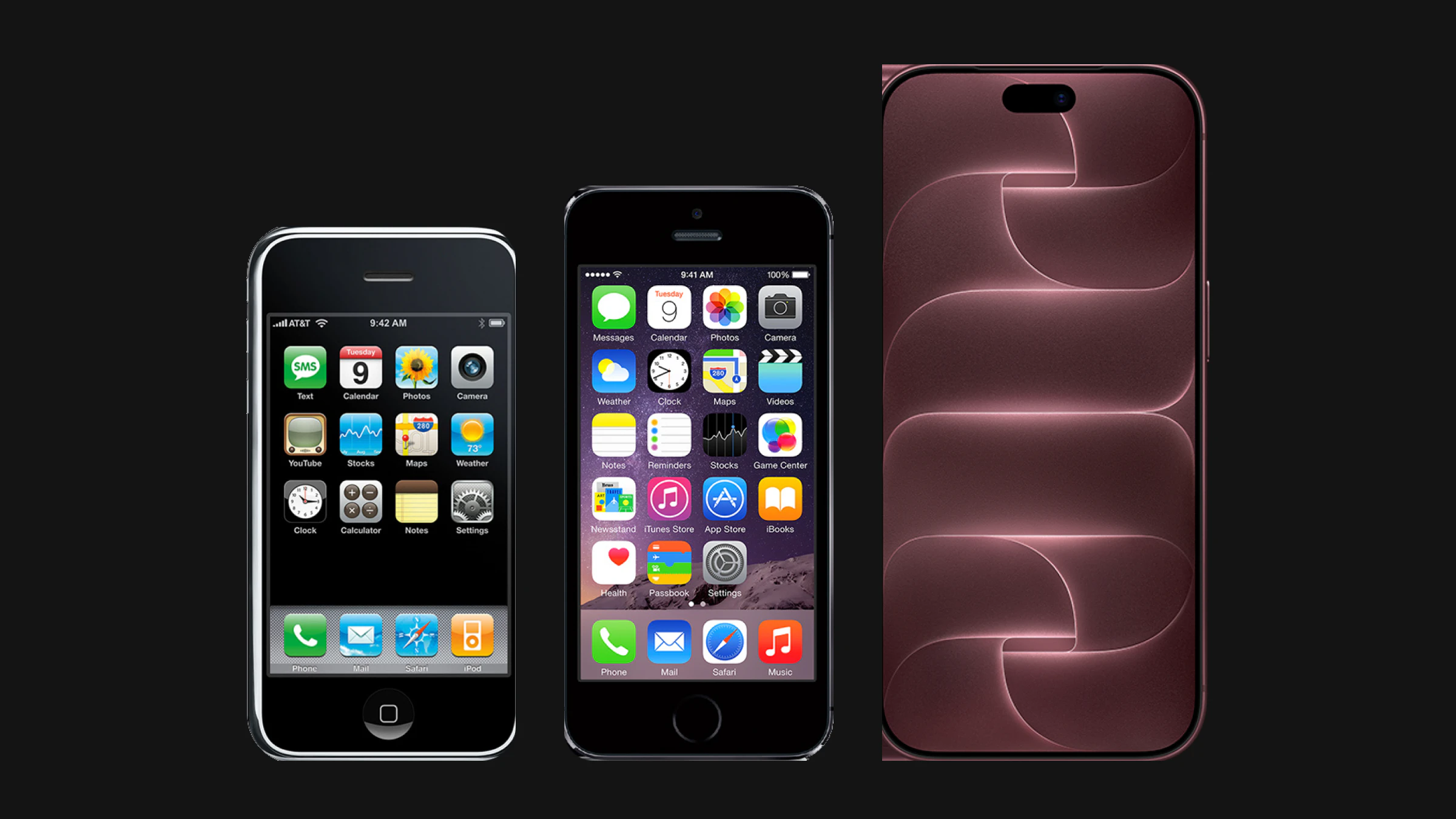
The two lineups below show one iPhone for each design step, in Apple's own product images, at the phone's real height and with the iOS it shipped with. Look at the clocks in the first row: the first three read 9:42, the next three 9:41.
How did the first iPhone set the vocabulary? (2007 to 2008)
The first iPhone, on sale from June 29, 2007, replaced the stylus and the keypad with a finger on glass, and nearly every gesture it shipped is still in iOS 27. Its 3.5-inch screen was 320 by 480 points, and there was no app store.
What the first release defined:
- Direct manipulation. Content moved with the finger. A flick kept scrolling with momentum and a list bounced back at its end, the rubber band that later became one of the most famous patents in Apple's trials against Samsung.
- Pinch to zoom in Photos, Safari and Maps, with one finger to scroll and two to zoom, a split Apple also patented.
- Slide to unlock. A track with an arrow knob and a shimmer running across the words beside it, a lock that taught the gesture by asking for it.
- One Home button. Whatever happened on screen, one press went home. It held that job for ten years.
- A Home Screen grid four icons wide over a Dock of four, still the skeleton of the iPhone Home Screen.
The interface looked like the objects it replaced. Settings rows had glossy icons and switches that read ON and OFF, toolbars carried a blue gradient, Notes looked like a yellow legal pad. Skeuomorphism was not decoration for its own sake: in 2007 few people had used a phone driven by a finger alone, and a switch that looked like a switch told them it could be flipped.
The App Store opened on July 10, 2008, with iPhone OS 2 and the iPhone 3G. Four days later Apple counted more than 800 native apps and 10 million downloads, and Steve Jobs called the store "a grand slam" (Apple Newsroom). Most of those apps were built from the same UIKit controls as Apple's own, which is why its conventions spread so fast: a change to a standard control changed thousands of apps at once.
What it still decides in your file. The grouped list, the switch, the tab bar at the bottom and the navigation bar at the top all date from 2007, and so does the habit of measuring in points rather than pixels. A control is sized for a fingertip, not a cursor: the 44 by 44 point minimum in Apple's guidelines is that idea written down, as Touch target size on iOS and Android shows.
Why did skeuomorphism peak, then end? (2009 to 2012)
From 2009 to 2012 the iPhone filled in what the first release left out, and its textures grew heavier with every version, until a new leader at the top of interface design reset them. Four years brought copy and paste, accessibility, Retina, notifications and Siri.
- iPhone OS 3, June 17, 2009. Copy and paste, Spotlight search and a landscape keyboard. The iPhone 3GS added VoiceOver, a screen reader driven by gestures, so blind people could use a phone that had no physical keys (Apple Newsroom).
- iOS 4, June 21, 2010. The system took the name iOS and gained multitasking, folders and Home Screen wallpapers. The iPhone 4 doubled the resolution to 640 by 960 pixels at 326 pixels per inch, while the layout stayed 320 by 480 points. That split between points and pixels, drawn once and exported at 2x and later 3x, is still how every iOS file is built.
- iOS 5, October 12, 2011. Notification Center slid down from the top of the screen, a pattern Android had used since its first release. iMessage arrived, and Siri launched on the iPhone 4S.
- iOS 6, September 19, 2012. The iPhone 5 made the screen taller, 320 by 568 points, the first time an app had to handle two heights. Apple replaced Google Maps with its own Maps, and its errors led Tim Cook to apologize in a public letter.
By iOS 6 the textures had taken over: leather and stitching in Find My Friends, green felt and wood in Game Center, a reel-to-reel tape deck in Podcasts, wooden shelves in Newsstand, linen behind notifications. They no longer taught anyone how to use a touchscreen; they only made each app look different from the next.
On October 29, 2012, Apple announced that Scott Forstall, who ran iOS software, would leave, and that Jony Ive "will provide leadership and direction for Human Interface (HI) across the company", in addition to industrial design (Apple Newsroom). Reports at the time tied the change to the Maps launch; Apple gave no reason.
What it still decides in your file. Points and 2x export come from 2010; variable heights from 2012. Textures also taught a lesson the next era learned again: a style baked into bitmaps cannot be themed, scaled or switched to dark. A style kept in tokens can.
What did iOS 7 change, and why so fast? (2013)
iOS 7 replaced every texture in the system with flat color, translucency and motion, and it shipped on September 18, 2013, less than a year after Ive took over interface design. Ive later told USA Today that the work began in November 2012, and that there was "an incredible liberty in not having to reference the physical world so literally" (TechRadar, reporting the interview). His argument: after six years of touchscreens, people no longer needed the metaphors.
What iOS 7 introduced:
- Layers instead of textures. Panels became translucent sheets that blurred what was behind them, so depth came from stacking, not from shadows and stitching.
- Thin type. Helvetica Neue in light weights carried the hierarchy that gradients used to carry.
- Text buttons. Most buttons lost their borders and became tinted words.
- Motion with physics. Parallax on the Home Screen, springs in transitions, and a swipe from the left edge to go back.
- Control Center, opened with a swipe from the bottom, with "quick access to the controls you want in one convenient place" (Apple Newsroom).
- Dynamic Type, which let people choose a text size that apps could follow.
- A new icon grid with flatter, brighter icons on a rounded square with continuous corners.
The redesign overshot. Thin white type on bright, blurred backgrounds was hard to read, and borderless buttons were hard to spot. iOS 7.1, in March 2014, added accessibility options to darken colors, reduce white point and show button shapes, beside the Bold Text and Reduce Motion settings iOS 7 already had. Looking back from 2016, AnandTech's review of iOS 10 judged that iOS 7 had made parts of the interface hard to tell apart.
What it still decides in your file. Flat design made contrast your job, not the texture's. Dynamic Type dates from 2013, and so does the continuous-corner icon shape. A token for every text color, checked against every surface it can sit on, is the direct answer to iOS 7's legibility problem.
How did bigger screens, San Francisco and iOS 10 correct course? (2014 to 2016)
Between 2014 and 2016 Apple made the iPhone bigger, gave it its own typeface and walked back the thinnest parts of iOS 7. By iOS 10 the system looked like iOS 7 with more weight: bolder headlines, cards and higher contrast.
- iOS 8 and iPhone 6, September 2014. Two new widths at once: 375 by 667 points at 4.7 inches and 414 by 736 points at 5.5 inches, which was also the first iPhone drawn at 3x. Apps had to stop designing for one device and start designing for a range of widths. iOS 8 also opened the system to extensions, Today widgets and third-party keyboards.
- iOS 9, September 16, 2015. San Francisco replaced Helvetica Neue as the system font, a family Apple introduced at WWDC 2015 as one it designed itself (WWDC15 session 804). It came in Text and Display cuts, so small sizes got looser spacing and large sizes got tighter. The iPhone 6s added 3D Touch: press harder to peek at content or open quick actions.
- iOS 10, September 13, 2016. The Lock Screen and notifications were rebuilt as cards. Slide to unlock, the gesture that had introduced the iPhone, gave way to Press Home to Open, because Touch ID now unlocked the phone the moment a finger rested on the button. Apple Music and News brought big, bold headlines, which iOS 11 turned into large titles across the system.
What it still decides in your file. Since 2014 an iPhone design is a layout for widths, not a frame for one device, and since 2015 the system font has optical sizes that a type scale should respect. The iPhone screen sizes in Figma article lists every current frame; the type scale and spacing in a design system should work at all of them.
What replaced the Home button? (2017 to 2019)
Gestures replaced the Home button on iPhone X, which reached stores on November 3, 2017, and it was the largest change to how an iPhone is used since 2007. Apple wrote that iOS 11 "replaces the Home button with fast and fluid gestures" (Apple Newsroom): swipe up from the bottom edge to go home, pause to see open apps, swipe along the bottom to switch.
The screen changed shape as well. The display ran to rounded corners and wrapped around a notch that held the Face ID cameras, so for the first time an app could not use the whole rectangle. The answer was the safe area: the part of the screen that no corner, notch or home indicator covers. iPhone X was 375 by 812 points, and every Face ID iPhone since has had its own safe area insets.
The next two releases built the rest of today's system on that screen:
- iOS 11, September 19, 2017. Large titles at the top of lists, a new Control Center and an App Store rebuilt around full-width cards.
- iOS 12, September 17, 2018. Screen Time and notifications grouped by app.
- iOS 13, September 19, 2019. Dark Mode across the whole system, built on semantic colors such as label and system background that change with the appearance. SF Symbols arrived with more than 1,500 icons drawn to match San Francisco; the library now holds "over 7,000 symbols" (Apple Developer). Sheets became cards that leave the screen behind them visible, and Haptic Touch, a long press with a tap of feedback, replaced the pressure sensing of 3D Touch on the iPhone 11.
What it still decides in your file. Three things every design system now needs come from these three years: layouts tied to safe areas, colors named by role so a whole screen can switch to dark, and an icon set that matches the text beside it. Dark mode with Figma variables shows the color part in practice.
When did the iPhone become personal? (2020 to 2024)
From iOS 14 in 2020 to iOS 18 in 2024, Apple handed the Home Screen and the Lock Screen to the people using them, and turned the camera cutout into an interface. Several of these had existed on Android for years. What Apple added was constraint: fixed widget sizes, system-drawn frames and strict rules for what an app may show there.
- iOS 14, September 16, 2020. Widgets on the Home Screen in three fixed sizes, the App Library that sorts apps automatically, and incoming calls and Siri as compact banners instead of full screens.
- iOS 15, September 20, 2021. Focus modes, and a lesson in convention. The Safari betas moved the address bar to the bottom and packed the controls into it. After loud criticism, beta 4 on July 27, 2021 restored the buttons (TechCrunch) and a later beta added a setting to keep the bar at the top. iOS 15 shipped with the bar at the bottom by default and the top as an option.
- iOS 16, September 12, 2022. A Lock Screen people could design, with their own clock font, color and widgets. From iOS 16.1, Live Activities kept an order or a score on screen.
- iPhone 14 Pro, September 16, 2022. The Dynamic Island turned the sensor cutout into a live surface that grows for calls, timers and Live Activities. Apple called it "a new design that introduces an intuitive way to experience iPhone", and the same phone brought the first Always-On display on an iPhone (Apple Newsroom).
- iOS 17, September 18, 2023. StandBy for a phone on its side, Contact Posters and widgets you can tap without opening the app. The iPhone 15 Pro replaced the mute switch with the Action button.
- iOS 18, September 16, 2024. Icons anywhere on the grid, dark and tinted icon variants and a Control Center people can rearrange. Apple Intelligence followed in iOS 18.1, and the iPhone 16 added the Camera Control button.
What it still decides in your file. Since 2024 an app icon is three icons, light, dark and tinted, and widgets since 2020 and Live Activities since 2022 come in fixed sizes you design for, not around. How to design a Live Activity and the Dynamic Island in Figma has the current dimensions. The Safari episode is the warning worth keeping: moving a control people have learned costs more than the reach it gains, unless they can move it back.
What is Liquid Glass, and why was it criticized? (2025)
Liquid Glass is the translucent material Apple introduced on June 9, 2025, for the controls and navigation that float above an app, and it was the first visual reset since iOS 7. Apple wrote that the material "reflects and refracts its surroundings", and Alan Dye, then vice president of Human Interface Design, called it "our broadest software design update ever" (Apple Newsroom).
What it changed:
- One design for every platform. iOS 26, iPadOS 26, macOS Tahoe 26, watchOS 26 and tvOS 26 shipped the same material, inspired by the depth of visionOS. The version numbers jumped from 18 to 26, so every platform now carries the number of the year after its release.
- A functional layer. Tab bars, toolbars and controls float above content as glass, rendered in real time with highlights that move with the phone. Content scrolls underneath.
- Shapes that follow the hardware. Controls became concentric with the rounded corners of the display, where they had been built for rectangles.
- Bars that get out of the way. Tab bars shrink while you scroll and come back when you scroll up.
- Layered icons built in Apple's new Icon Composer, with clear and tinted looks.
iOS 26 shipped on September 15, 2025, with the iPhone 17 line and iPhone Air, and the criticism was immediate. On October 10, 2025, Raluca Budiu of Nielsen Norman Group wrote that "Apple is prioritizing spectacle over usability" (NN/g). The article pointed to text over busy backgrounds, controls that animate without purpose, smaller and more crowded tap targets, search moved to the bottom and a back button without its label.
Apple adjusted within weeks. iOS 26.1 added a Liquid Glass setting with a tinted look beside the default clear one, and iOS 26.2 let people set how opaque the Lock Screen clock's glass is (Apple Support).
What it still decides in your file. Glass is a material for the functional layer, never for cards or rows in the content. Every glass control has to read over white, black and a busy photo, and with Reduce Transparency on. How to make Liquid Glass in Figma has the settings and the legibility checks.
What did iOS 27 change? (2026)
iOS 27, released on September 14, 2026, kept Liquid Glass and gave people control over it: a slider in Settings that runs "from ultraclear to fully tinted", with "more uniform refraction and improved contrast" across the system (Apple, iOS 27). Apple corrected its last two redesigns within months, iOS 7 with 7.1 and iOS 26 with 26.1. With iOS 27 it handed the correction to the people using the phone.
- The slider. Apple announced it on June 8, 2026 as a way to personalize Liquid Glass anywhere between the two ends (Apple Newsroom). Apps that use the system material follow it without changes.
- Icons. Apple says app icons were "updated to be sharper and more defined" (Apple Newsroom).
- Siri AI at the top edge. With Siri AI turned on, a swipe down from the top center of the screen opens Siri, and Notification Center moves to a swipe from the top-left corner, where alerts now slide in. 9to5Mac called it the end of fifteen years of muscle memory, and there is no setting to keep the old gesture (9to5Mac).
- No more opting out. Apps built with the iOS 27 SDK can no longer keep the previous design: the system ignores the compatibility key that allowed it in iOS 26, as an Apple engineer confirmed on the Apple Developer Forums and as covered in How to make Liquid Glass in Figma.
The hardware moved too. The iPhone 18 Pro and Pro Max arrived in September, and iPhone Duo, Apple's first foldable, went on sale on October 23, 2026 with iOS 27.1 (MacRumors). On its outer display, the system moves toolbars and tab bars to the side of the screen. How to design for iPhone Duo in Figma covers both displays.
The people changed as well. Alan Dye left Apple for Meta at the end of 2025, and Stephen Lemay, who in Tim Cook's words "has played a key role in the design of every major Apple interface since 1999", took over interface design (9to5Mac). iOS 27 is the first major release since. Apple has not said whether its readability work was planned before the change.
What it still decides in your file. A glass control now has to work at every point of the slider, not at one setting you pick in Figma. The top edge belongs to the system more than ever, so keep your own controls out of the top center and the top-left corner. And a design system has to cover a folding screen whose bars move to the side.
Who decided how iOS looks?
The two biggest turns in the look of iOS each followed a change at the top of interface design: iOS 7 shipped eleven months after Ive took over in 2012, and iOS 27's readability work came after Alan Dye left in 2025. Liquid Glass itself came from a team that had been in place for a decade. That is a pattern in the dates, not a claim about motives: Apple announces departures, not the reasons behind its redesigns.
| Person | Role in the iPhone interface | Years | What shipped on their watch |
|---|---|---|---|
| Steve Jobs | CEO, introduced the iPhone in January 2007 | 2007 to 2011 | Multitouch, the App Store, the skeuomorphic style |
| Scott Forstall | Senior vice president of iOS software | 2007 to 2012 | iPhone OS 1 to iOS 6, Maps; departure announced October 29, 2012 |
| Greg Christie | Designed the original iPhone interface and built Apple's Human Interface group, after working on the Newton | 1996 to 2014 | Named on more than 100 Apple patents, slide to unlock among them (InformationWeek) |
| Jony Ive | Industrial design, then all Human Interface from 2012, chief design officer from 2015 | 2012 to 2019 | iOS 7, the flat era, iPhone X |
| Alan Dye | Vice president of Human Interface Design | 2015 to 2025 | iOS 9 to iOS 26, Dark Mode, Dynamic Island, Liquid Glass |
| Stephen Lemay | Leads interface design, at Apple since 1999 | 2025 to now | iOS 27 and its readability work |
What it still decides in your file. Very little directly, and that is the point. A style that depends on one person's taste changes when the person does. The parts of iOS that survived every change of leader are the structural ones: the points grid, the safe area, the semantic colors, the type scale. Those are the parts worth encoding in a design system.
How did Android, Microsoft and the web respond?
Apple set the direction more often than it followed, but the borrowing ran both ways, and the iPhone's flat era was preceded by Microsoft's. The table pairs each move with the answer or the precedent.
| Year | Apple | Google, Microsoft and others |
|---|---|---|
| 2008 | App Store, rubber band scrolling, pinch to zoom | Android 1.0 ships with a pull-down notification shade |
| 2010 | Retina and the point grid | Windows Phone 7 introduces Metro: flat color, type-led layouts, no textures |
| 2011 | Notification Center, pulled down from the top | Android's shade, in place since 2008 |
| 2013 | iOS 7 goes flat | Flat design spreads across the web and Android apps |
| 2014 | Bigger screens, extensions | Google announces Material Design at I/O: surfaces that behave like paper, with real elevation. Within a year, over a million products in the Android store used parts of it (Google Design) |
| 2017 | Gestures replace the Home button | Android 10 adds full gesture navigation in 2019 |
| 2019 | Dark Mode, SF Symbols | Android 10 adds a system dark theme the same year |
| 2020 | Home Screen widgets | Android has had them since 2009 |
| 2021 | Focus, Safari at the bottom | Material You derives the system colors from the wallpaper (Material Design) |
| 2022 | Dynamic Island, Always-On display | Android phones had shipped always-on displays for years |
| 2025 | Liquid Glass | Google's 2025 update to Material 3, tested in 46 studies with more than 18,000 participants; people found a key button about four times faster in the expressive design (Google Design) |
The interaction patterns were valuable enough to fight over. On August 24, 2012, a US jury found that Samsung infringed Apple's bounce-back, scroll and pinch, and tap-to-zoom patents and awarded Apple nearly $1.05 billion (Engadget). A second case over slide to unlock, autocorrect and tappable phone numbers ended in a $119.6 million award that the Federal Circuit reinstated in October 2016 (MacRumors).
On the web, each era left a trend behind: flat design after iOS 7, glassmorphism around 2020, and Liquid Glass imitations in 2025. The two platforms now differ less in what they can do than in how they draw it, which is why one design system can serve both. iOS vs Material 3: what changes per component goes through those differences one control at a time.
Where does iPhone design stand at the end of 2026?
At the end of 2026 an iPhone screen is no longer one picture you hand off. It is a range that the system and the person holding the phone move it through, inside chrome that Apple redraws every September. Nineteen years of history explain how it got there, and five shifts describe what that asks of a design file.
The look is partly a user setting
Light or Dark, Increase Contrast on or off, Reduce Transparency on or off and the twelve Dynamic Type sizes already give one screen 96 combinations. Bold Text doubles that, and the iOS 27 slider adds a continuous range on top of every one of them. Since iOS 18 people can also tint every icon on their Home Screen, yours included, so even the brand color of an app icon is no longer yours to guarantee. A Figma frame shows one point in that space; the design work is making sure the other points hold.
Apple keeps redrawing the chrome
iOS 7 and iOS 26 each restyled every standard control at once. Apps built from UIKit's tab bars, toolbars and sheets changed with them for free; apps with custom bars had to be redesigned by hand, twice. Since the iOS 27 SDK ignores the opt-out key, a custom navigation bar is a cost that comes due every September. Apple's own branding guidance points the same way: brand color belongs in the content, where it scrolls under the glass, not painted onto the controls.
The edges belong to the system
Every few years the system has claimed more of the screen's edge: the rounded corners and the home indicator in 2017, the Dynamic Island in 2022, side bars on iPhone Duo and Siri along the top edge in 2026. What is left for an app is the middle, and its size changes by device, by orientation and, on Duo, by fold. Layouts that started from the safe area survived every one of these changes. Layouts that started from the device frame did not.
Corrections arrive through accessibility first
Both redesigns that overshot were fixed the same way. iOS 7.1 added options to darken colors and show button shapes before the defaults themselves grew bolder by iOS 10; iOS 26.1 added a tinted look less than a year before iOS 27 made it a slider. The people who turn those settings on see the corrected iOS first, and many never turn them off. Test your screens in that state first, not last.
The two platforms drew apart again
From 2013 to 2024 iOS and Android converged on flat surfaces, cards and bottom navigation. In 2025 they split: Apple chose a translucent material that takes its color from the content, Google pushed Material 3 toward bold shapes, tonal color and spring motion. A product that ships on both can no longer carry its identity in its chrome on either one. It carries it in content, type, imagery and motion, and lets each platform draw its own bars.
Your file has an iOS version
Apple ships the visual change in September and the first correction in the .1 or .2 release a few months later. A file that mirrors iOS is a snapshot of one release, and it is worth writing down which. When the next release lands, the question is not whether your screens still look right, but which of the shifts above it moved.
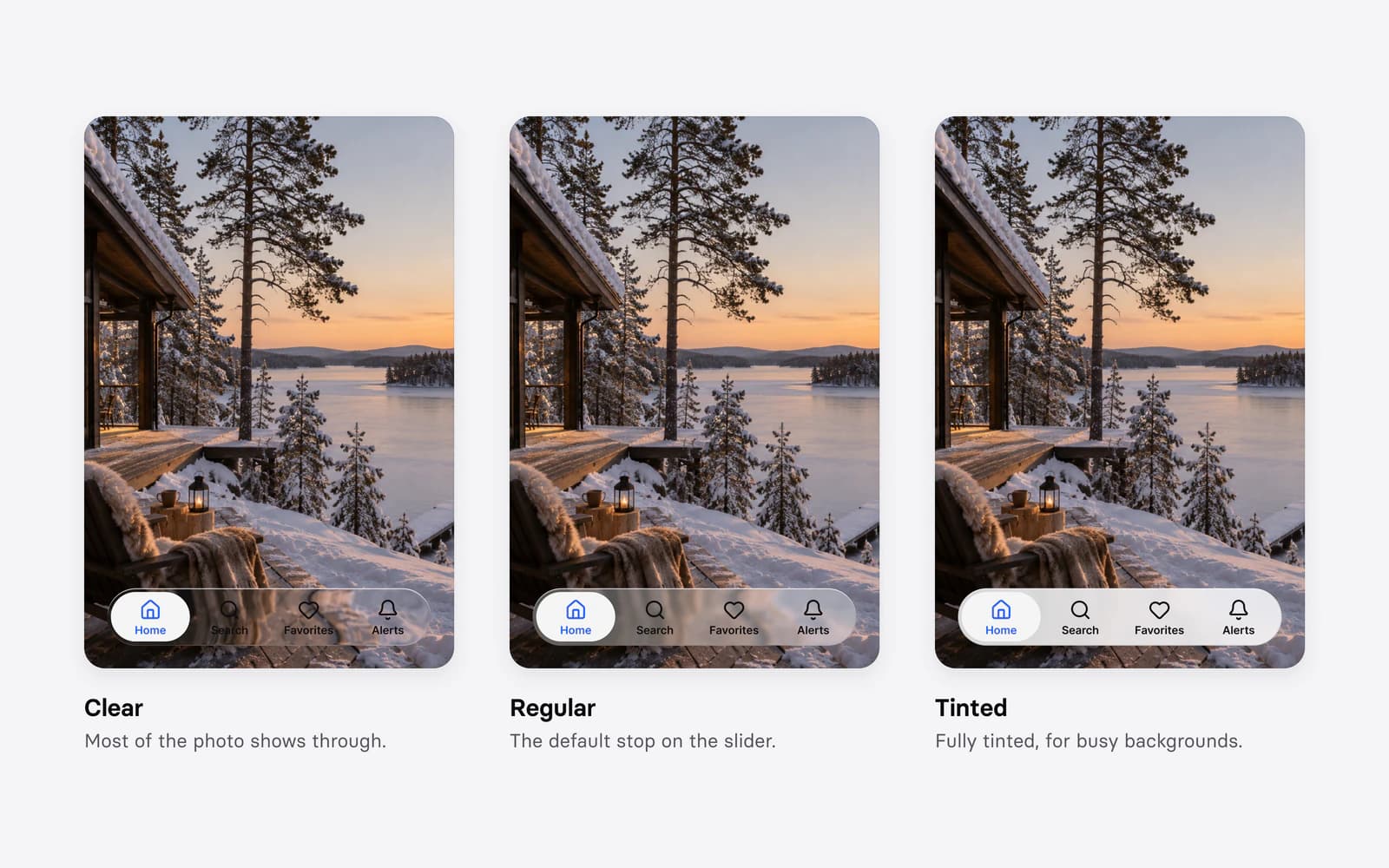
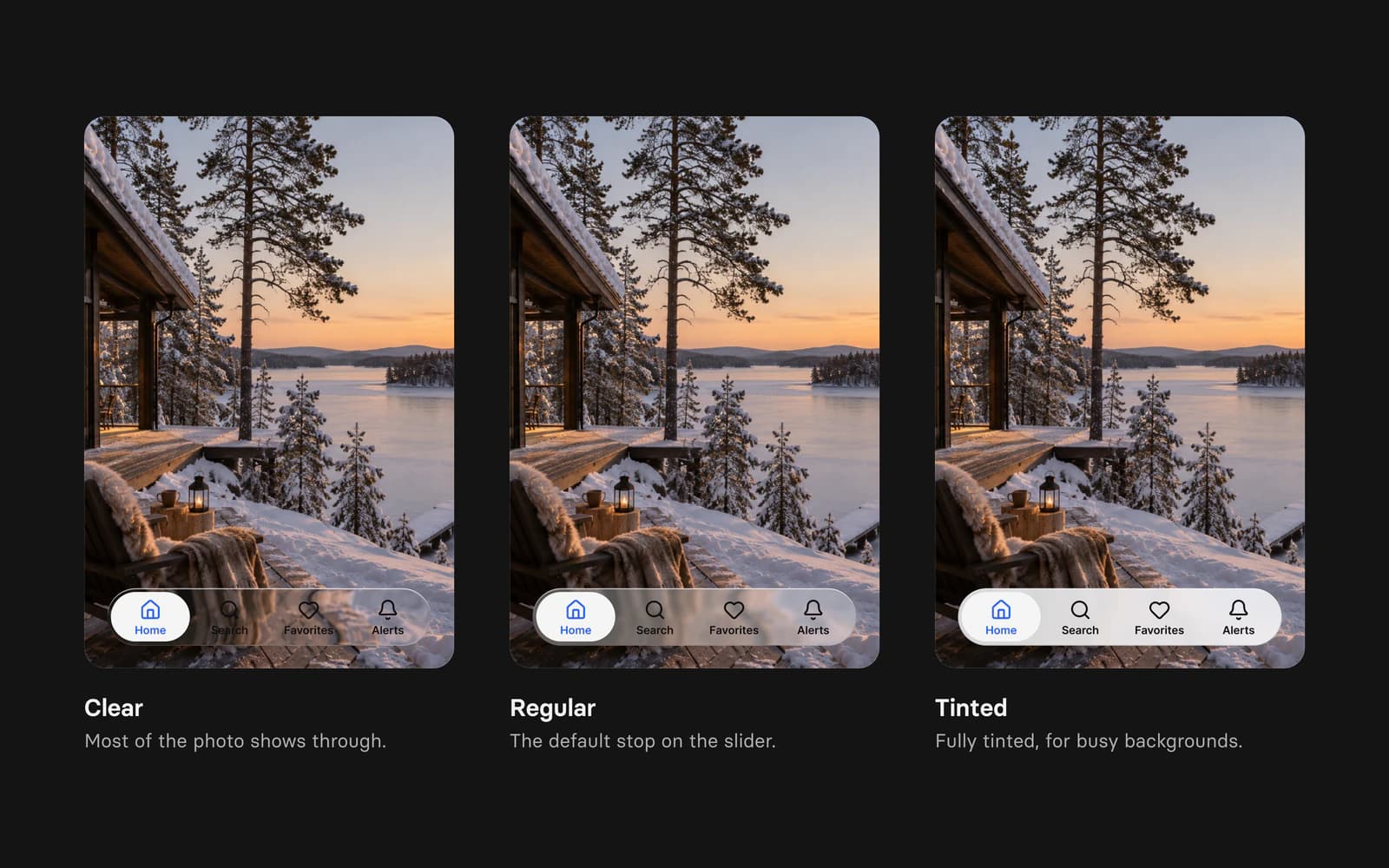
Appetite UI is built on that split between structure and look. Its 589 variables in 6 collections hold color, type, spacing and radius in one token source, so a rebrand is one edit. Its iOS components follow iOS 27 and ship the Clear, Regular and Tinted glass styles, and the same token source drives its Material 3 components for Android.
Questions
When did Apple switch from skeuomorphism to flat design?
With iOS 7, released on September 18, 2013. Jony Ive's team started the redesign in November 2012, after he took over Human Interface design, and replaced textures with translucency, layers and thin type.
Why did Apple remove slide to unlock?
iOS 10, in September 2016, replaced it with Press Home to Open. With Touch ID, resting a finger on the Home button already unlocked the phone, so the slide had become an extra step.
What is Liquid Glass?
Liquid Glass is Apple's translucent material for controls and navigation, introduced on June 9, 2025 with iOS 26 and every other Apple platform. It bends and reflects the content behind it, and iOS 27 lets people adjust it from ultraclear to fully tinted.
Can you turn Liquid Glass off?
Not completely. In iOS 27 people can move the slider to fully tinted or turn on Reduce Transparency, and apps built with the iOS 27 SDK can no longer opt out of the design: Apple's documentation says the system ignores the opt-out key "when you build for iOS 27 or later".
Which iOS version introduced Dark Mode?
iOS 13, released on September 19, 2019, together with semantic system colors and SF Symbols.
Who leads iOS design now?
Stephen Lemay, who took over Apple's interface design when Alan Dye left for Meta at the end of 2025. Tim Cook said Lemay had a key role in every major Apple interface since 1999.
Sources
Every page below was read on October 29, 2026.
Text:
- WikipediaiOS version history
- EngadgetWhy 9:41 AM is always the time displayed on iPhones and iPads
- Apple NewsroomiPhone App Store downloads top 10 million in first weekend
- Apple NewsroomApple announces the new iPhone 3GS
- AppleRetina display on iPhone 4, archived July 2010
- Apple NewsroomApple announces changes to increase collaboration across hardware, software and services
- TechRadarJony Ive on iOS 7
- Apple NewsroomiOS 7 with completely redesigned user interface and great new features available September 18
- AnandTechThe iOS 10 review
- Apple DeveloperWWDC15 session 804, Introducing the New System Fonts
- Apple NewsroomThe future is here: iPhone X
- MacRumorsiPhone X notch, everything you need to know
- Apple DeveloperSF Symbols
- TechCrunchApple tweaks controversial iOS 15 Safari changes in latest beta
- Apple NewsroomApple debuts iPhone 14 Pro and iPhone 14 Pro Max
- MacRumorsApple no longer sells any iPhones with a Home button
- Apple NewsroomApple introduces a delightful and elegant new software design
- Nielsen Norman GroupLiquid Glass is cracked, and usability suffers in iOS 26
- Apple SupportAbout iOS 26 updates
- AppleiOS 27
- Apple NewsroomApple unveils next generation of Apple Intelligence, Siri AI and more
- Apple NewsroomMajor updates for Apple's software platforms are now available
- 9to5MaciOS 27 just broke 15 years of muscle memory on iPhone and iPad
- MacRumorsiPhone Duo release date and pre-orders
- Apple SupportiPhone Duo technical specifications
- Apple SupportiPhone 18 Pro technical specifications
- 9to5MacApple design VP Alan Dye departing for Meta
- InformationWeekApple loses iOS designer Greg Christie
- Google DesignMaterial Design launch, 2014
- Material DesignAnnouncing Material You
- Google Designthe research behind the 2025 Material update
- EngadgetBreakdown of the decisions in the Apple versus Samsung verdict
- MacRumorsApple vs Samsung $120M award reinstated
- Apple DeveloperHuman Interface Guidelines, Branding
- Apple Developer ForumsClarification on the planned removal of UIDesignRequiresCompatibility
Images:
- Product images in figures 04 and 05 and on the cover: . © AppleApple Support, Identify your iPhone model
- Screens and product shots from apple.com, via the Internet Archive: , iOS 6, October 2012, iOS 7 design, October 2013, iOS 8, October 2014, iPhone 6s 3D Touch, October 2015, iOS 10, October 2016, iPhone X, November 2017. © AppleiPhone 4 features, July 2010
- Apple Newsroom press images: , iOS 13, iOS 14, iPhone 14 Pro, iOS 18, iOS 26, WWDC 2026. © AppleiPhone X
- Wikimedia Commons: by Blake Patterson, CC BY 2.0; Slide to unlock by istolethetv, CC BY 2.0; Unlocked iPhone by John Ballinger, CC BY 2.0; White iPhone 3G keyboard by Feureau, CC BY-SA 3.0; Original iPhone, iPhone 3G, iPhone 4 by Yutaka Tsutano, CC BY 2.0; iPhone 4 with Twitter by William Hook, CC BY 2.0; Newsstand on iOS 6 by Delicje, CC BY-SA 4.0; iPhone 5s by Ashok Govind, CC BY 2.0; iPhone 6 setup screen by Tony Webster, CC BY-SA 2.0; iPhone Duo Home Screen by Kyu3a, CC BY-SA 4.0Apple Newton and iPhone