Figma MCP for mobile: make your agent build with your components
Figma's MCP server hands an agent the canvas. What it returns for a mobile frame, and what makes the agent build with your tokens and components.

On this page
Figma's MCP server gives a coding agent what is on the canvas you point it at: the layer tree, the variables and styles a frame uses, the description written on each component, and Code Connect snippets where you have set them up. Whether the agent then builds with your components depends on the file. It needs variables named for their purpose with code syntax stored on them, a description on every component, and written rules for which token and which platform pattern to use, because the server passes on what the file says and nothing more.
Appetite UI is a Figma UI kit for iOS and Android apps, built like a design system. One token source drives Apple and Material components in light and dark mode, and exports to SwiftUI, Jetpack Compose, Flutter and CSS. Every output quoted below was read from its Finance app through Figma's remote server on October 7, 2026.
Figma's MCP server reads the canvas through a handful of tools.
Figma's guide says the MCP server "helps developers explore and implement designs quickly and accurately." It comes in two forms. The remote server, at https:/, is "available on all seats and plans", and Figma marks it "preferred". The desktop server runs through the Figma desktop app and is "available on a Dev or Full seat for all paid plans."
Use is climbing fast. Figma's results release for the first quarter of 2026, published May 14, 2026, states: "In the three months ended March 31, 2026, MCP weekly active users in Figma Design grew five times quarter-over-quarter." The same release says Figma shipped capabilities "that let agents read and write directly to Figma files." This article stays with reading, because that is where a build starts.
Four read tools carry a design-to-code run, each described here in Figma's own words:
get_metadatareturns "a sparse XML representation of your selection containing just basic properties such as the layer IDs, names, types, position and sizes."get_variable_defs"returns the variables and styles used in your Figma selection, such as colors, spacing, and typography."get_design_contextgets the design context for a layer or a selection, and "by default, the output is React + Tailwind."get_screenshottakes a picture of the selection, which Figma says "helps preserve layout fidelity in the generated code."
Figma's tools page lists more, among them search_design_system and get_code_connect_map. Every call counts against a limit: up to 20 a month on a View or Collab seat, and up to 200 a day on a Dev or Full seat on the Professional plan.
One mobile frame shows what the server hands over.
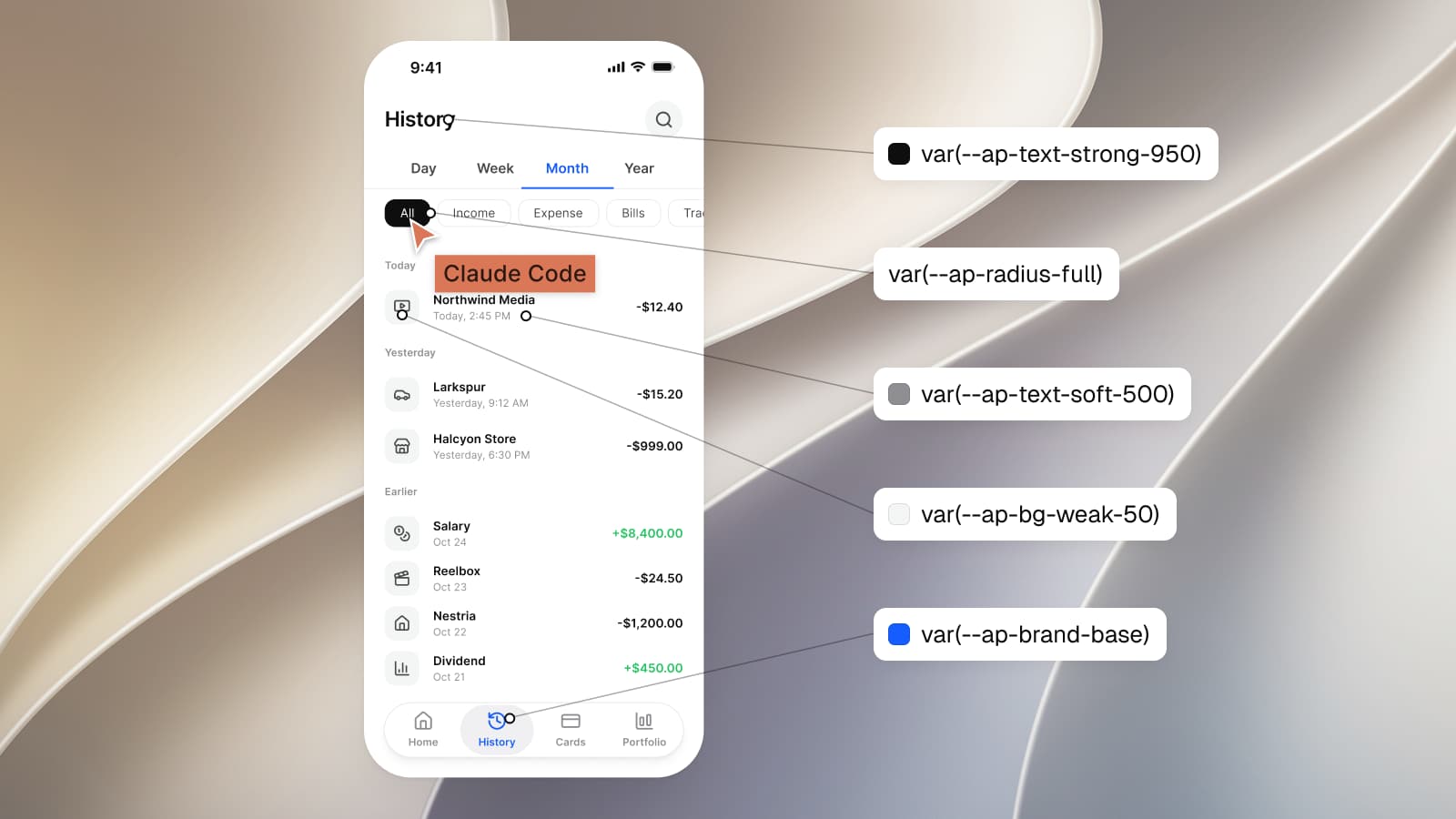
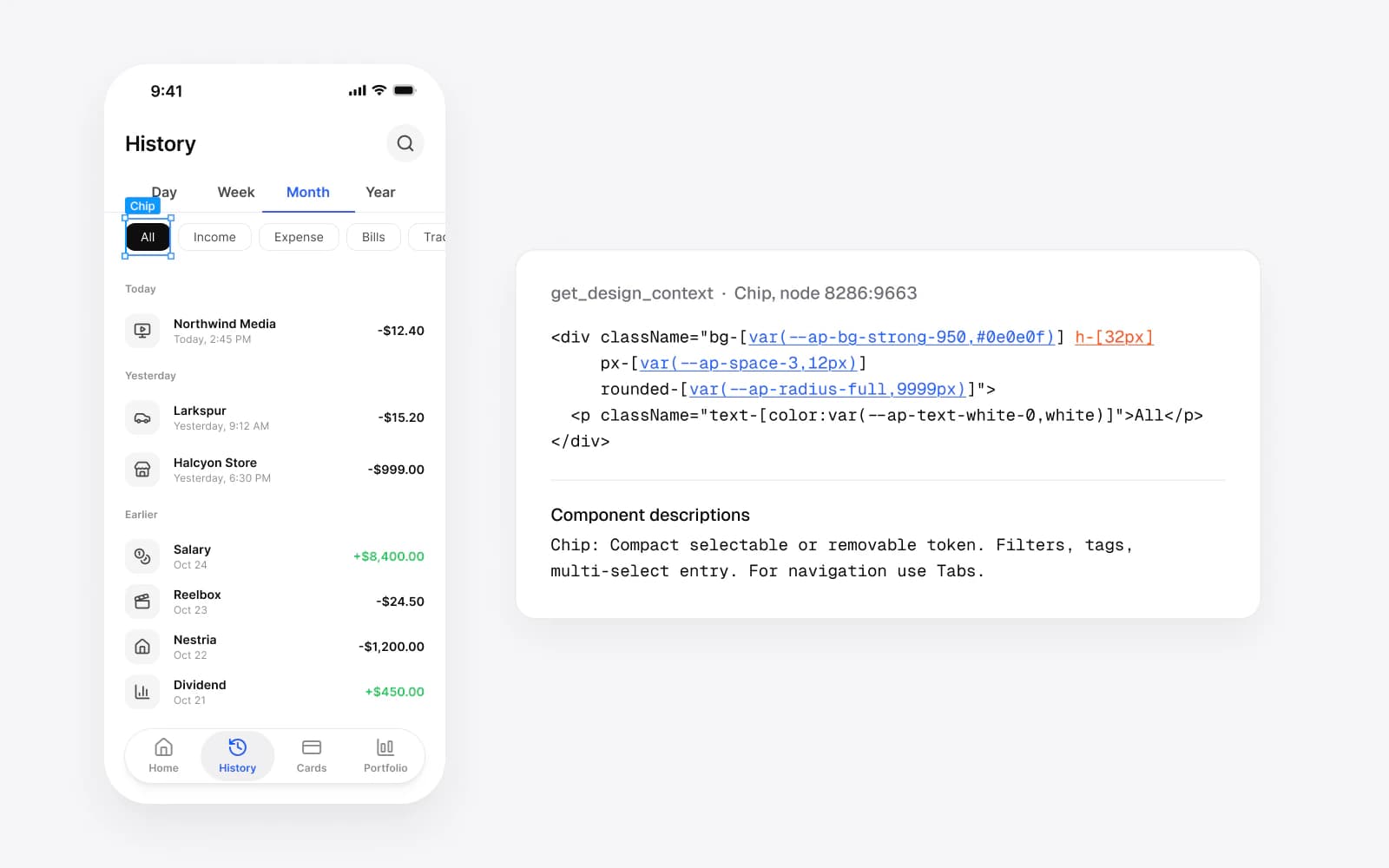
I pointed the server at Finance / History, a transaction list in the Appetite UI file: an iOS status bar, a Top Bar, Tabs, a row of five filter Chips, records grouped under Today, Yesterday and Earlier, and a tab bar. get_metadata returned the outline, with the names the layers carry in the file:
<frame id="8286:8899" name="Finance / History" x="5503" y="-985" width="393" height="852">
  <instance id="8286:8900" name="iOS / Status Bar" x="0" y="0" width="393" height="59" />
  <instance id="8286:9693" name="Top Bar" x="0" y="59" width="393" height="64" />
  <frame id="8286:9662" name="Filters" x="0" y="171" width="393" height="56">
    <instance id="8286:9663" name="Chip" x="24" y="6" width="53" height="44" />
get_variable_defs on the same frame returned 64 entries: every variable the frame binds, plus six text styles and two effect styles. An excerpt, copied as it came back:
{
  "var(--ap-bg-weak-50)": "#f4f5f5",
  "var(--ap-text-strong-950)": "#0e0e0f",
  "var(--ap-text-soft-500)": "#8e8e93",
  "var(--ap-brand-base)": "#155dfc",
  "var(--ap-radius-lg)": "12",
  "var(--ap-space-4)": "16",
  "var(--ios-sys-typography-headline)": "18",
  "sm/emphasized": "Font(family: \"var(--ap-font-body)\", style: Semi Bold, size: var(--ap-font-size-sm), weight: var(--ap-font-weight-emphasized), lineHeight: var(--ap-line-height-sm), letterSpacing: var(--ap-letter-spacing-wide))"
}
Each value is resolved in the mode of the frame you point at. The Dark copy of the same screen returned the same names with other values: var(--ap-brand-base) became #2b7fff and var(--ap-bg-weak-50) became #242427. One call shows one mode, so an agent that has to write both reads two frames or reads the token file, where the two values sit on one token.
The name the agent types is the code syntax you stored on the variable.
Every key in that output is a CSS custom property, var(--ap-bg-weak-50), and none is a Figma path such as bg/weak-50. That is the code syntax stored on the variable. Figma lets a variable hold "one name per platform, including Web, Android, and iOS", and Dev Mode shows that name in its code snippets for CSS, SwiftUI and Compose. In this run the MCP server handed over the web one.
get_design_context does the same inside the code it returns. Here is the Northwind Media row from the History screen, trimmed to its classes:
<div className="bg-[var(--ap-bg-weak-50,#f4f5f5)] rounded-[var(--ap-radius-lg,12px)] size-[40px]">
<p className="text-[color:var(--ap-text-strong-950,#0e0e0f)] text-[length:var(--ap-font-size-sm,14px)]">Northwind Media</p>
<p className="text-[color:var(--ap-text-soft-500,#8e8e93)] text-[length:var(--ap-font-size-xs,12px)]">Today, 2:45 PM</p>
Each class carries the variable's name with the Light value as a fallback. An agent building for the web can keep the names as they are. An agent building in SwiftUI or Compose has a translation to make, and the server does not make it. I asked for the same chip a second time with the client framework set to SwiftUI. The answer was the same React with the same web names, because the file has no Code Connect mapping labeled SwiftUI for the server to switch to. Figma's documentation says why the server keeps returning web code: agents are "commonly trained on large amounts of web-based data", and the server delivers design context, leaving the translation to the agent.
So the mobile names have to sit somewhere the agent can read them. In Appetite UI they sit on the variable in Figma and again in tokens/tokens.json, which ships with the file:
"weak-50": {
  "$type": "color",
  "$value": "{colors.gray.50}",
  "$extensions": {
    "com.appetiteui": {
      "collection": "Color Tokens",
      "modes": { "light": "{colors.gray.50}", "dark": "{colors.gray.900}" },
      "codeSyntax": {
        "web": "var(--ap-bg-weak-50)",
        "ios": "Color.apBgWeak50",
        "android": "AppetiteTheme.colors.bgWeak50"
      }
    }
  }
}
An agent that holds both the frame and this file translates a name, var(--ap-bg-weak-50) to Color, and never has to look at a hex. Every one of the 589 variables carries the code name of each platform it serves. How one Figma token becomes SwiftUI, Compose, Flutter and CSS follows one of them through the build.
One value in the chip arrived without a name: h-[32px], the height of the Input Chip, which is not bound to a variable. That is what the output looks like for anything the file did not decide with a variable, and an agent has no way to tell whether 32 is a rule or an accident.
A component description travels with every instance the agent reads.
The end of each get_design_context answer had a section the variables cannot carry. Figma heads it "Component descriptions" and tells the agent that they "provide important context about the intended usage, best practices, and any constraints for each component." For the chip, it printed the description written on the Chip component in the file:
Compact selectable or removable token. Filters, tags, multi-select entry. For navigation use Tabs.
The last sentence is a rule. An agent asked to add a section switcher above the list now has a reason to reach for Tabs, which the same screen already uses, instead of a fourth chip. The design.md that ships with the file states the standard the descriptions follow: every component "carries a description that states intent and names its platform equivalent."
The transaction rows on this screen show the other side. They are frames named Record, built from tokens, so the server returned them as nested divs with token classes and no description at all. The values survive the trip; the intent of the row does not. Figma's guide to structuring a file draws the same line: "anything repeated should be a component", and default layer names such as Frame1268 should give way to names that say what the layer is for.
Code Connect maps your own code, and it needs an Organization plan.
Figma describes Code Connect as "a bridge between your codebase and Figma's Dev Mode, connecting components in your repositories directly to components in your design files." It is "available on the Organization and Enterprise plans" on a Full or Dev seat. Figma's structure guide calls it "the #1 way to get consistent component reuse in code", and the MCP server can return one mapping per framework: on the remote server you tell the agent to set clientFrameworks to the label of your mapping, such as React or SwiftUI.
Appetite UI ships no Code Connect mappings. A kit sold to many teams cannot know the import path of your Button, and a mapping that points at someone else's code is worse than none. I replaced Code Connect with the Core Skill in release 2.3, because a snippet answers how to call a component and leaves open which token and which platform pattern it takes. If you have your own component library in code and an Organization plan, map it: the server will then hand your agent your component in place of a div.
The rules a canvas cannot hold go in a file the agent reads.
A frame shows one decision already taken. It cannot say what to do on the other platform or when nothing fits. The Core Skill, skills/appetite-core/SKILL.md in the file you buy, writes those rules down. Its first one tells the agent to read the tokens before producing anything and, in Figma, to "list the six local variable collections." Its second forbids a primitive or a typed hex. Its twelfth picks the pattern by platform:
Primary action: iOS puts it in the bottom toolbar or in content. Android uses a FAB.
The output above already holds one of those platform answers. var(--ios-sys-typography-headline) came back as 18. That variable is a Platform Bridge slot: in Brand mode it points at the Appetite UI size step typography/fontSize/lg, in System mode it returns Apple's 17, and its iOS code syntax is Font, Apple's own text style. Read alone, the frame says 18. Read with the token file, it says this is Apple's headline style with your brand's size on it. Where the iOS and Material slots differ, iOS vs Material 3: what changes per component lays them side by side.
| The agent asks for | The server returns | Appetite UI adds |
|---|---|---|
| The structure of a frame | get_metadata: layer ids, names, types, positions and sizes | Layer names that say what a part is, such as Top Bar, Tabs and Tab bar |
| The values a frame uses | get_variable_defs: each variable under its web code syntax, in the frame's mode | tokens.json with the Light and Dark value and the code name for each platform |
| Code for a selection | get_design_context: React and Tailwind with var() classes and Light fallbacks | The Core Skill's naming table, from var(--ap-bg-weak-50) to Color and AppetiteTheme |
| How a component is meant to be used | The component's description, under Component descriptions | A description on every component that states intent and names its platform equivalent |
| Which platform pattern fits | Only the pattern drawn in the frame | Core Skill rule 12, which picks the pattern for iOS and for Android |
| What to do when no value fits | A bare number, such as h-[32px] | Core Skill rule 15: stop and report the gap, never invent a value |
Connecting the server takes one command or one config file.
Figma's installation page covers each client, and each client's own docs say where the setting lives. The Core Skill install is from the README in the file you buy.
Connect the remote server to your client.
In Claude Code, run
claude mcp add --transport http figma https:/, then type/ mcp .figma .com/ mcp /, select figma, choose Authenticate and allow access. In Cursor, use Figma's deep link, or add the server tomcp .cursor/in the project ormcp .json ~/for every project. In VS Code, add a.cursor/ mcp .json serversentry named figma with"type": "http"and the same URL to.vscode/, then press Start and allow access.mcp .json Give the agent the rules and the names.
Copy
AI-context/intoskills/ appetite-core .claude/in the repository, or paste the block fromskills/ AI-context/intoagents/ cursor-rules .md .cursor/. Putrules/ appetite-ui .mdc AGENTS,.md designand.md tokens/at the repository root so the agent can look a name up.tokens .md Point the agent at one frame.
Copy the link to a frame in Figma, a link with a node-id in it, and ask the agent to build that screen in SwiftUI or Compose with the Appetite UI tokens.
Read the answer for names.
Check that colors, spacing and radii arrive as code names such as
Colorand.apBgWeak50 AppetiteSpacing, and that the platform chrome matches the platform you asked for..space4
Claude Code also stores a server for the whole team in .mcp at the project root with --scope project. From each tool's documentation, read October 7, 2026, and linked under Sources.
Test the setup on one frame before you trust it with an app.
A single frame tells you within minutes whether the agent read anything. Pick a screen you already have, ask for it in the language you ship, and compare. If the answer carries Color and the dark version came from the same token, the server and the rules are working together. If it carries #f4f5f5, the agent copied the fallback out of the class and translated nothing. If the chrome is wrong for the platform, the rules never reached it.
The run I describe here read two frames and two components. One screen from Appetite UI, step by step follows a whole SwiftUI build with Claude Code, and the Core Skill article explains the file the agent reads. The Core Skill and tokens.json come with the file, and pricing lists what it includes. The AI page shows a run end to end, and the read-only Figma preview lets you open Finance / History and check every name above against the variables panel.
Questions
Is the Figma MCP server free to use?
Yes, within limits. Figma's remote MCP server is available on all seats and plans. Figma allows up to 20 tool calls a month on a View or Collab seat and up to 200 a day on a Dev or Full seat on the Professional plan. The desktop server needs a Dev or Full seat on a paid plan.
Does the Figma MCP server generate SwiftUI or Jetpack Compose code?
No. The Figma MCP server returns React and Tailwind by default, and Figma's docs say the agent translates that context into your language. With Code Connect mappings labeled SwiftUI, the remote server can return your SwiftUI component for a mapped node. Without a mapping, the iOS and Android names have to come from your token file.
Do I need Code Connect for the Figma MCP server to be useful?
No. Without Code Connect, the Figma MCP server still returns the variables, the text and effect styles and the component descriptions a frame uses. Code Connect, on the Organization and Enterprise plans, adds a link to your own code components.
Does the Figma MCP server see light and dark mode?
The Figma MCP server resolves each variable in the mode of the frame you point it at. In my run the Light and Dark copies of one Appetite UI screen returned the same variable names with different values. Both values of a token sit together in Appetite UI's tokens.json.
Can an agent read Appetite UI tokens without buying the file?
Partly. /tokens.json holds the token values the Appetite UI docs previews draw, with light and dark values and the web, iOS and Android names of each, and every docs page is readable as Markdown. The full token source, the Figma file and the Core Skill come with the purchase.
Sources
- Figma Learn, Guide to the Figma MCP server, read October 7, 2026
- Figma developer docs, Tools and prompts, read October 7, 2026
- Figma developer docs, Rate limits and access, read October 7, 2026
- Figma developer docs, Structure your Figma file for better code, read October 7, 2026
- Figma developer docs, The server keeps returning web/react code, read October 7, 2026
- Figma developer docs, Remote server installation, read October 7, 2026
- Figma Learn, Create and manage variables and collections, read October 7, 2026
- Figma Learn, Code Connect, read October 7, 2026
- Figma Investor Relations, Figma Announces First Quarter 2026 Financial Results, read October 7, 2026
- Claude Code documentation, Connect Claude Code to tools via MCP, read October 7, 2026
- Cursor documentation, Model Context Protocol, read October 7, 2026
- VS Code documentation, Use MCP servers in VS Code, read October 7, 2026