Updated
Effects
Appetite UI shows depth with six drop shadows, an edge shadow and four backdrop blurs, puts bars, buttons and sheets on Liquid Glass in three styles, and marks keyboard focus with a 2 pt ring. Pick the style by what the surface is.
Updated
Preview
The file holds 16 effect styles in four groups: drop shadows, backdrop blurs, Liquid Glass and focus rings. The shadow ramp comes first, one surface in six steps, because it is the part that reaches the code.
- xs
- sm
- md
- lg
- xl
- 2xl
Every step is two layers and both are pure black. No step carries a hue or a second value for dark mode.
Which shadow goes on which surface?
Pick the step by what the surface is. Chips and small pressables take xs, cards at rest sm, raised cards and dropdowns md, popovers and menus lg, modals and sheets xl, and full-screen overlays 2xl. Never pick one by how deep it looks.
dropShadow/xs
Subtle lift. Chips and small pressables.
0 1 2 spread 0, 4% 0 4 4 spread 0, 1%
dropShadow/sm
Cards at rest.
0 9 10 spread -2, 3% 0 3 5 spread -2, 5%
dropShadow/md
Raised cards and dropdowns.
0 10 15 spread -3, 5% 0 4 6 spread -4, 8%
dropShadow/lg
Popovers and menus.
0 12 18 spread -3, 8% 0 5 6 spread -5, 5%
dropShadow/xl
Modals and sheets.
0 14 20 spread -5, 8% 0 6 10 spread -5, 10%
dropShadow/2xl
Full-screen overlays.
0 25 30 spread -6, 12% 0 8 10 spread -6, 12%
In dark mode a shadow says little. The ramp holds one set of values for both modes, so black at 1 to 12 percent on a #0E0E0F surface barely separates a card from the page.
To lift a surface in dark, use the bg/raised token (#FFFFFF in Light, #242427 in Dark) instead of a deeper shadow.
What is the edge shadow for?
dropShadow/edge is a side shadow for a pinned column, or for a panel that content scrolls under. It falls to the right of the element that carries it.
Use it where something stays put while content moves beneath it: the first column of a Table, a sidebar over a scrolling list. A ramp step throws its shadow down, and a pinned edge needs it sideways. It is a single layer, unlike the six steps, and it has no Dark value either.
Which blur radius should I use?
Four backdrop blurs of 8, 16, 24 and 40 pt. A blur needs something behind it, so the element carries a semi-transparent fill. A fully opaque fill leaves nothing for the blur to show through.
| Style | Radius | Use |
|---|---|---|
backdropBlur/sm | 8 | Light scrim blur behind sheets. |
backdropBlur/md | 16 | Standard nav bar and tab bar blur. |
backdropBlur/lg | 24 | Heavy blur for modal backdrops. |
backdropBlur/xl | 40 | Maximum blur for full-screen overlays. |
Read the four radii as a sequence. The Tokens table gives blur() as the value to start from on the web, and a Figma blur radius and a CSS blur() radius do not map one to one.
How do the three Liquid Glass styles differ?
They are three stops on the iOS 27 transparency slider. Clear shows the content through the glass, with refraction and a rim light only. Regular is frosted with a defined edge and is the default for bars, buttons, menus and sheets. Tinted is fully tinted, for busy backgrounds and Reduce Transparency.
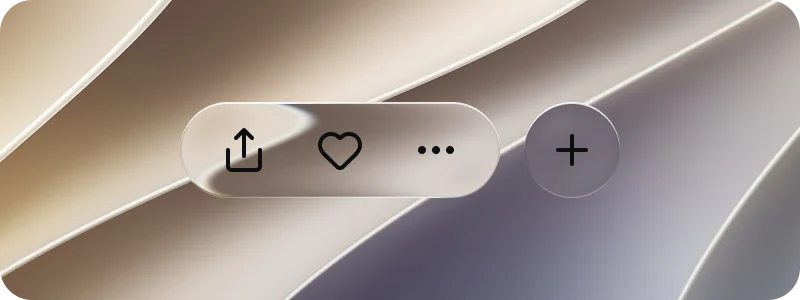
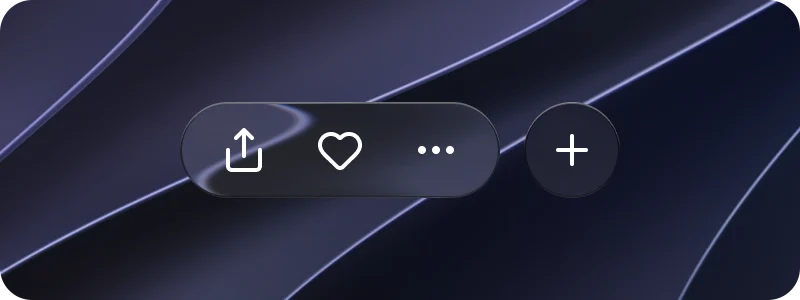
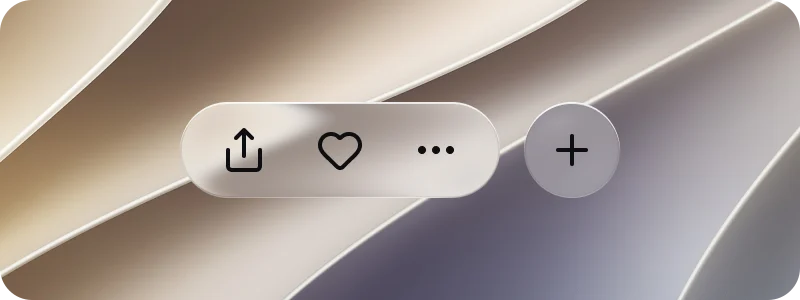
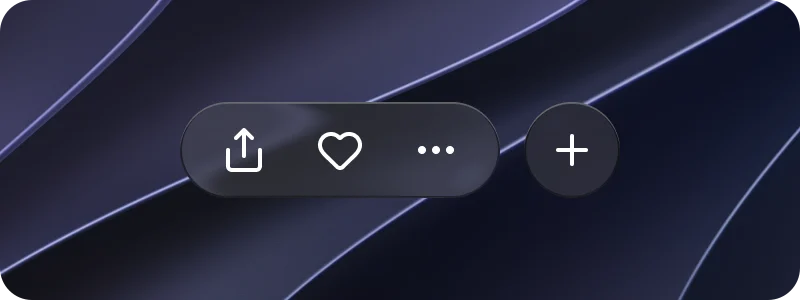
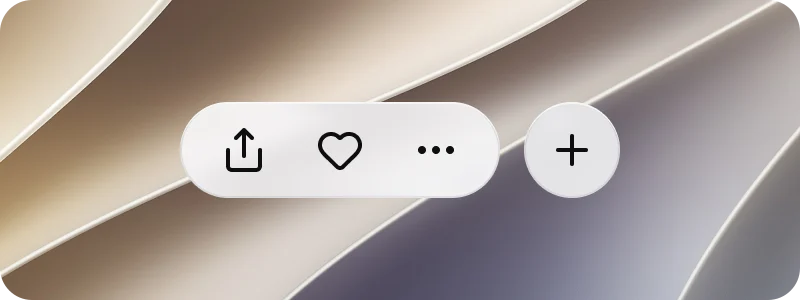
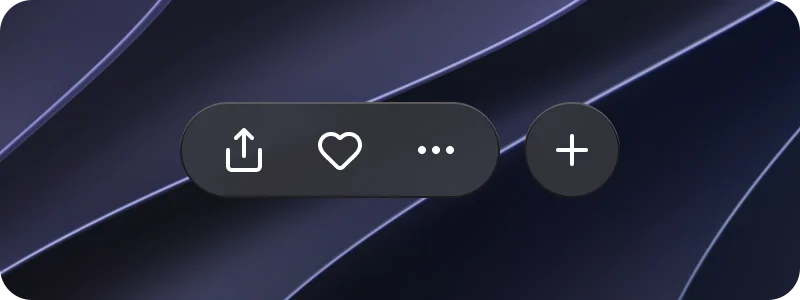
Light or Dark comes from the Color Tokens mode of the frame. The glyphs follow that mode whatever sits behind the glass.
| Style | Refraction | Frost | Dispersion | Light | Tint token |
|---|---|---|---|---|---|
liquidGlass/Clear | 0.8 | 2 | 0.25 | 0.35 | glass/tint-clear, white at 6% Light, white at 8% Dark |
liquidGlass/Regular | 0.7 | 6 | 0.2 | 0.25 | glass/tint-regular, white at 32% Light, #4D4D52 at 45% Dark |
liquidGlass/Tinted | 0.6 | 12 | 0.15 | 0.25 | glass/tint-tinted, #F7F7FA at 86% Light, #38383D at 86% Dark |
All three share depth 30, splay 0.2 and a light angle of 0. Each adds the same three layers on top of the glass: a lift shadow (glass/lift, black at 4% Light and 24% Dark, offset 8, blur 15), an edge shade one point wide (glass/edge-shade, black at 8% Light and 50% Dark) and a rim light one point down (glass/rim-light, white at 75% Light and 28% Dark), with the tint of its own stop between them.
Put the style on the background layer of the element, never on a frame that holds the content. On a frame with content it recolors the children too. The glass is a GLASS effect in Figma, which bends what sits behind it as well as blurring it.
Use liquidGlass in the file, reach for the platform's own glass material in code, and treat the token as a Figma instruction rather than a web spec.
What does the focus ring look like?
A 2 pt gap in the surface color, then a 2 pt ring in brand/base. Destructive controls take the same ring in state/error/base-500.
The ring is two stacked drop shadows with no blur, which is the same as box-shadow: 0 0 0 2px. It follows any corner radius and takes no room in the layout. Apply it to the node that draws the control: the box of a checkbox, the dot of a radio, the track of a toggle. Never apply it to the hit-area frame around the control. That frame stays 44 pt on iOS and 48 dp on Android (platform/min-touch-target), and the ring does not grow it.
In dark the gap takes the dark surface (bg/white-0 is #0E0E0F there) and the ring takes brand/base in its Dark value, #2B7FFF, so it still reads.
| Style | Gap | Ring | Light | Dark |
|---|---|---|---|---|
focusRing/brand | bg/white-0 | brand/base | #FFFFFF, #155DFC | #0E0E0F, #2B7FFF |
focusRing/error | bg/white-0 | state/error/base-500 | #FFFFFF, #FB2C36 | #0E0E0F, #FB2C36 |
Tokens
All 16 effect styles. Shadow offsets read x y blur spread in pt, and every shadow layer is pure black at the stated alpha unless a token is named.
| Token | Value | On the web |
|---|---|---|
dropShadow/xs | 0 1 2 spread 0, 4% and 0 4 4 spread 0, 1% | box-shadow, layer for layer |
dropShadow/sm | 0 9 10 spread -2, 3% and 0 3 5 spread -2, 5% | box-shadow, layer for layer |
dropShadow/md | 0 10 15 spread -3, 5% and 0 4 6 spread -4, 8% | box-shadow, layer for layer |
dropShadow/lg | 0 12 18 spread -3, 8% and 0 5 6 spread -5, 5% | box-shadow, layer for layer |
dropShadow/xl | 0 14 20 spread -5, 8% and 0 6 10 spread -5, 10% | box-shadow, layer for layer |
dropShadow/2xl | 0 25 30 spread -6, 12% and 0 8 10 spread -6, 12% | box-shadow, layer for layer |
dropShadow/edge | 6 0 12 spread -4, 8% | box-shadow, one layer |
backdropBlur/sm | radius 8 | Approximated, blur(8px) |
backdropBlur/md | radius 16 | Approximated, blur(16px) |
backdropBlur/lg | radius 24 | Approximated, blur(24px) |
backdropBlur/xl | radius 40 | Approximated, blur(40px) |
liquidGlass/Clear | frost 2, refraction 0.8, depth 30, dispersion 0.25 | No equivalent |
liquidGlass/Regular | frost 6, refraction 0.7, depth 30, dispersion 0.2 | No equivalent |
liquidGlass/Tinted | frost 12, refraction 0.6, depth 30, dispersion 0.15 | No equivalent |
focusRing/brand | 0 0 0 spread 2 bg/white-0, 0 0 0 spread 4 brand/base | box-shadow, two layers |
focusRing/error | 0 0 0 spread 2 bg/white-0, 0 0 0 spread 4 state/error/base-500 | box-shadow, two layers |
| Appetite UI style | iOS counterpart | Material 3 counterpart | What differs |
|---|---|---|---|
dropShadow/xs to 2xl | No named shadow ramp | Elevation levels, drawn as shadow and tonal surface | One ramp for both platforms, with the same values in Brand and System mode. |
liquidGlass/* | Liquid Glass, on the iOS 27 transparency slider | None, Material 3 has no glass | Appetite UI fixes three stops of the slider as styles. Refraction and frost exist in Figma only. |
focusRing/* | The system focus ring shown with a hardware keyboard | A state layer at 10% opacity (M3/sys/state/focus) | Appetite UI draws a 2 pt gap and a 2 pt ring on both platforms, where Material tints the control. |